


BCBSMA MyBlue Member App
4.7636.00 Reviews
App Specs
- Version
- 7.47
- Updated On
- License
- Free
- Downloads
- 100,000+
- Developer
- BCBSMA
- Categories
- Medical
- Platform
- Android
Screenshots
 Analysis by AppCompare
I judge a health insurance app less by how polished it looks than by whether it helps when I need an answer quickly: at a clinic desk, while checking a claim, or when I’m trying to work out what my plan covers. BCBSMA MyBlue Member App is built for Blue Cross Blue Shield of Massachusetts members, and its main value is putting membership details and common insurance tasks in one place. It is free, developed by BCBSMA, and listed as a medical app for everyone. I’d think of it as a practical companion to your coverage, rather than a substitute for understanding the plan itself.
What it is like to use today
The app’s strongest use case is straightforward: you already have BCBSMA coverage and want to handle routine membership tasks from your phone instead of searching through papers or signing in on a larger screen. A digital ID card can be useful when you arrive for an appointment, while claims and benefits information can help you orient yourself before calling the insurer or a provider.
That convenience matters most when the question is specific and time-sensitive. For example, if a clinic asks for your member details, having the ID card accessible can save a few minutes of searching your wallet or email. If you’re reviewing a claim later, seeing its status in the same app gives you a sensible starting point for deciding whether you need to follow up.
There is an important boundary, though: a benefits screen is a guide to your plan, not a guarantee of what a particular visit or procedure will cost. I would use it to check the details and prepare questions, then confirm anything financially significant with the insurer or provider. That’s a safer approach than treating a quick glance at an app as a final coverage decision.
Who will get the most from it
I’d recommend it to BCBSMA members who regularly need their ID card, check claim progress, or want an easy place to review plan information. It is also useful for someone who prefers to do basic insurance housekeeping on a phone and wants to look up an in-network doctor without starting from a general web search.
It is less compelling if you are not a BCBSMA member, since the app is designed around that membership rather than serving as a general health-record or appointment platform. It may also be the wrong tool if you expect it to replace every conversation with your insurer, explain complicated coverage decisions in plain language, or manage care across unrelated health systems. In those cases, the insurer’s direct support or a provider’s own portal may be a better next step.
How it fits into the insurance routine
Compared with keeping a physical card and calling customer service for every question, the app offers a more immediate way to check basic membership and claims information. Compared with a provider’s portal, its focus is different: I would turn to MyBlue for insurance details and network searches, and to a clinic or hospital system for information tied to appointments or care there. Neither replaces the other, so it helps to know which one is likely to answer the question you have.
Worth Reading Before You Choose

EA SPORTS FC Mobile 26 Is a Bigger Football Game, but It Takes Time

Flipboard Shows What News Apps Must Do Beyond the Feed

Switching to Android Auto Means Rethinking Your Driving Routine

Google Calendar Makes a Crowded Week Easier to Manage

Ludo King Makes the Most of the Minutes Between Plans

Baby Panda World Brings Quick Play to Modern Phones, but Its Game Library Feels Busy
A useful habit is to check your coverage details before you need them, rather than waiting until you are at a reception desk. If you are planning a visit, look up the relevant benefits and provider information ahead of time, and keep the digital ID card easy to find. For a claim, use the status as a prompt to gather the date of service and any paperwork you have before contacting support. That small bit of preparation can make a follow-up conversation more focused.
First Impressions and Setup
Getting started with the BCBSMA MyBlue Member App was a breeze. Downloading it from the App Store or Google Play didn’t take long, and I was up and running in a matter of minutes. The interface is clean and user-friendly, which is always a plus in my book. Once you log in with your member credentials, everything is laid out quite neatly.
Setting up involved a couple of security checks, which made me feel like my info was in safe hands. The app asks for some permissions, but nothing out of the ordinary. All in all, it was a smooth start.
Features That Stand Out
One of the first things you’ll notice is how comprehensive the app is. It’s like having a personal assistant for all your health insurance needs. Here’s a breakdown of what caught my eye:
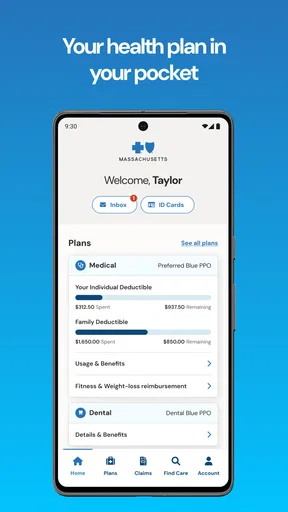
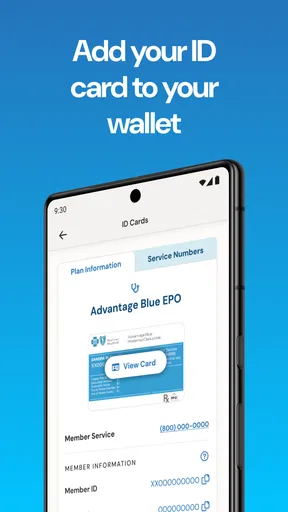
- Digital ID Cards: No more rifling through your wallet at the doctor’s office. The app provides easy access to your ID card.
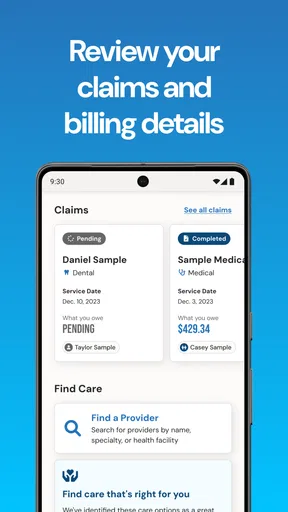
- Claims Tracking: This feature is a lifesaver. You can view your claims history and see where everything stands at a glance.
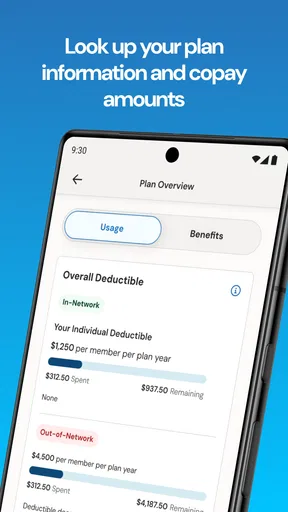
- Benefits Information: It’s all there—your deductibles, out-of-pocket expenses, and coverage details.
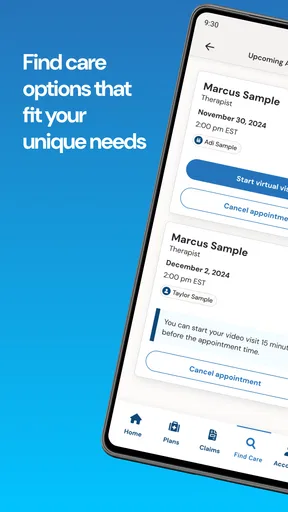
- Find a Doctor: The app includes a handy tool to locate healthcare providers within your network.
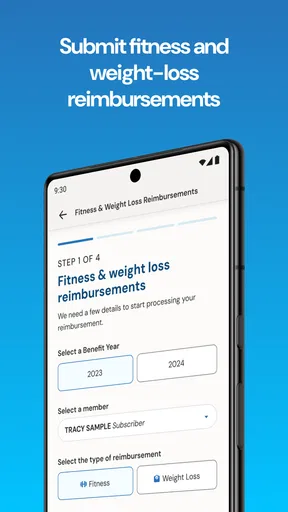
Beyond these core features, I also appreciated the app’s focus on wellness. There are tools to track your health goals, and even some wellness incentives if you’re into that sort of thing.
User Experience
As someone who values a smooth user experience, I found the app’s design intuitive and easy to navigate. The developers clearly prioritized a clean, uncluttered interface. Finding what you need doesn’t require a treasure map—everything is logically placed.
Notifications are another aspect worth mentioning. The app sends timely alerts on claim updates, which is great if you’re the kind of person who forgets to check these things regularly (guilty!).
Performance and Reliability
No app is perfect, but the BCBSMA MyBlue Member App came pretty close during my testing. It performed well without any noticeable lag. Crashes? None that I experienced. It’s refreshing to use an app that doesn’t freeze up or randomly log you out.
The app also seemed to be light on battery usage. After using it throughout the day, my phone still had plenty of juice left, which is a win in my book.
Product changes and what they mean
The current version is 7.41, and the app first appeared on June 26, 2015. That gives it a long-running role in BCBSMA’s member services, but those facts alone don’t tell me which screens or tools have changed over time. I wouldn’t assume that a particular recent release introduced a feature unless the app itself explains it. What matters to a returning member is whether the version available on their phone still makes familiar tasks—finding a card, checking benefits, or reviewing a claim—easy to locate.
If you already use it, I’d treat an update as a reason to take a quick look around rather than expecting a dramatic redesign. Check that your sign-in still works, confirm that the ID card and claims areas are where you expect, and review any settings that affect alerts. If a screen behaves differently, the app’s version number can help when describing the issue to support. That is a practical way to handle change without relying on assumptions about what an update was meant to do.
Small decisions that make it more useful
One non-obvious benefit of having insurance details together is that you can separate “I need to show my membership” from “I need to understand my coverage.” Those are different tasks. At the appointment desk, the ID card is usually the immediate need; when planning care, the benefits and network tools are more relevant. Knowing that distinction can keep you from trying to answer a complicated cost question from the wrong screen.
For a realistic example, imagine you receive a claim update while busy at work. Rather than trying to resolve it on the spot, you can note the service, check the status when you have a moment, and gather any related paperwork before deciding whether to contact BCBSMA. The app can make that first check more convenient, but the careful follow-up still comes from comparing the claim with your own records and asking a direct question when something does not make sense.
The provider search also rewards a little care. I would use it to create a shortlist, then verify that the specific clinician and location fit the network details for my plan before booking. A provider’s name appearing in a search is a useful lead, not a reason to skip checking. Networks and plan terms can be more specific than a quick search result suggests, so that extra confirmation is worthwhile when out-of-pocket costs matter.
Where I would be cautious
Insurance apps simplify access; they do not make insurance simple. A claim’s status may tell you where it stands, but it may not answer every question about why a decision was made or what you owe. Similarly, benefit summaries are helpful for orientation, but an unusual service, referral, or billing situation may need a conversation with the insurer or provider. I would not use the app alone to make a high-stakes financial decision.
There is also a trade-off in concentrating membership details on a phone. It is handy when the device is with you and you can sign in, but it is not a reason to discard every backup. If you are heading to an appointment and want to avoid a last-minute scramble, make sure you can access your account beforehand and keep another way to retrieve your member information available when practical. That is especially sensible if the appointment is important or you expect to be without reliable phone access.
The wellness tools and incentives may appeal to members who like tracking goals, but they are not the main reason I would choose this app. If you mainly want detailed fitness coaching, a dedicated wellness service may suit you better. MyBlue’s distinct purpose is member administration—insurance information, claims, and finding care—so I would judge it on those jobs rather than expect a complete personal health platform.
Ratings, reach, and the practical verdict
The app has a 4.7 average from around 1.8 thousand ratings, with over 100 thousand installs. Those figures suggest that many members have found a reason to keep it, though they cannot tell me whether it will fit every plan or solve an individual claim issue. I see them as context, not a substitute for checking whether you are eligible to use it and whether its core tools match your routine.
For me, the best reason to install it is simple: it can reduce the friction of routine insurance tasks when you are already a BCBSMA member. The least convincing reason would be expecting it to provide clinical advice or settle every coverage question without help. If you need the former, look to a qualified health professional; if you need a definitive answer about benefits or a claim, use the app to get oriented and then contact the appropriate support channel.
Final Thoughts
All things considered, the BCBSMA MyBlue Member App is a solid choice for managing your health insurance details on the go. It offers a comprehensive suite of features, wrapped up in a smooth, user-friendly package. Whether you’re tracking claims, searching for a doctor, or just checking your benefits, this app makes the process seamless.
If you’re a member of Blue Cross Blue Shield of Massachusetts, downloading this app is a no-brainer. It simplifies the often-complicated world of health insurance, and for that, it gets a big thumbs up from me.
What I would watch over time
For an app tied to insurance, useful evolution is less about novelty and more about dependable access: clear explanations, easy navigation after changes, and reliable routes from a claim question to the next step. I would watch whether the tasks members return for remain straightforward, especially after updates, and whether the information is easy to distinguish from a final coverage determination.
My recommendation is positive but specific. If you have BCBSMA coverage and want a convenient place to handle routine member tasks, this is worth keeping on your phone. If you need broad medical records, care coordination across insurers, or detailed help with a complicated billing dispute, pair it with the relevant provider portal or direct support instead. Used for what it is best at, it can make the administrative side of care feel a little less cumbersome.
Pros
- User-friendly interface for easy navigation.
- Real-time updates on claims and benefits.
- Comprehensive health tracking tools included.
- Secure access to personal health information.
- Convenient appointment scheduling feature.
Cons
- Occasional login issues reported by users.
- Limited support for non-English languages.
- Some features require a stable internet connection.
- Notifications can be inconsistent at times.
- Customization options are somewhat limited.
FAQs for BCBSMA MyBlue Member App
What features does the BCBSMA MyBlue Member App offer?
The BCBSMA MyBlue Member App provides a range of features to enhance your healthcare experience. Users can access their plan details, view claims, find doctors, and track deductibles. Additionally, the app offers a virtual ID card and wellness programs, making it a comprehensive tool for managing health insurance needs.
Is the BCBSMA MyBlue Member App available for both Android and iOS?
Yes, the BCBSMA MyBlue Member App is available for download on both Android and iOS devices. You can find it on the Google Play Store for Android users and the Apple App Store for iOS users. Ensure your device meets the required specifications for optimal performance.
How secure is my personal information on the BCBSMA MyBlue Member App?
The BCBSMA MyBlue Member App employs advanced security measures to protect your personal information. The app uses encryption and secure login protocols to ensure your data is safe. Always keep your app updated to benefit from the latest security enhancements and features.
Can I use the BCBSMA MyBlue Member App to manage my family's healthcare?
Yes, the BCBSMA MyBlue Member App allows users to manage multiple family members’ healthcare information. You can access each member's plan details, view their claims, and track their healthcare expenses, making it easier to manage your family's insurance needs all in one place.
What should I do if I encounter issues with the BCBSMA MyBlue Member App?
If you experience any issues with the BCBSMA MyBlue Member App, you can contact customer support directly through the app or visit the BCBSMA website for assistance. They offer support via phone and email to help resolve any technical or account-related concerns you might have.


